

Chapter 11
Account and notifications
Manage your profile, language, email, password and email notifications, and sign out of your devices.
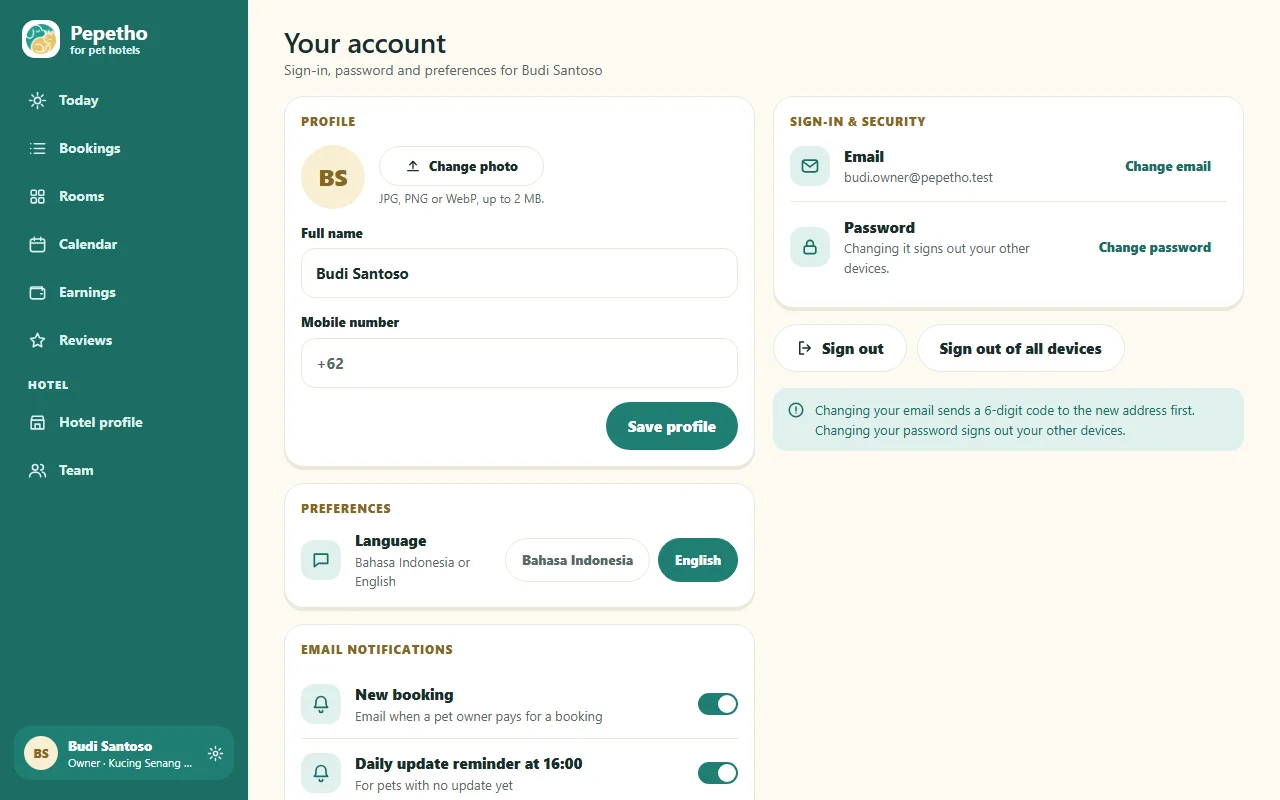
Your account holds how you sign in, your password and your preferences. On a laptop, open it from your name in the side menu. On a phone, open the More tab, then Your account.
Profile
Change your name and photo, then press "Save profile". The photo can be JPG, PNG or WebP, up to 2 MB.
Language
In Preferences, choose Bahasa Indonesia or English. The language applies to your account only. Other team members choose their own.
Email notifications
- New booking: an email when a pet owner pays for a booking.
- Daily update reminder at 16:00: for animals that have not had an update that day.
Emails about your listing and your team are always sent.
Change email
- In Sign-in & security, press "Change email".
- Fill in your current password and the new email, then press "Send code".
- Fill in the 6-digit code sent to the new address.
The new email takes effect once the code is entered. The old address is told as well.
Change password
Press "Change password", fill in the current and the new password, then save. Your other devices are signed out once the password changes.
Forgot your password? Sign out, then use "Forgot password?" on the sign-in page.
Signing out
- Sign out: signs out on this device only. On a phone, the button is in the More tab.
- "Sign out of all devices": every phone and computer signed in to this account has to sign in again. Use it if a phone is lost or you think someone else has signed in.
Choose "Keep me signed in on this device" when signing in only on a personal device.