

Chapter 1
Create your partner account
Create the pet hotel owner account in the Pepetho backoffice in about 2 minutes, then start setting up your listing.
Everything a pet hotel does on Pepetho happens in the backoffice, partner.pepetho.com. Signing up only needs the owner account. You fill in the pet hotel details afterwards, step by step.
You do not need an ID card, business documents or a bank account to sign up. The bank account is asked for when you first cash out your earnings.
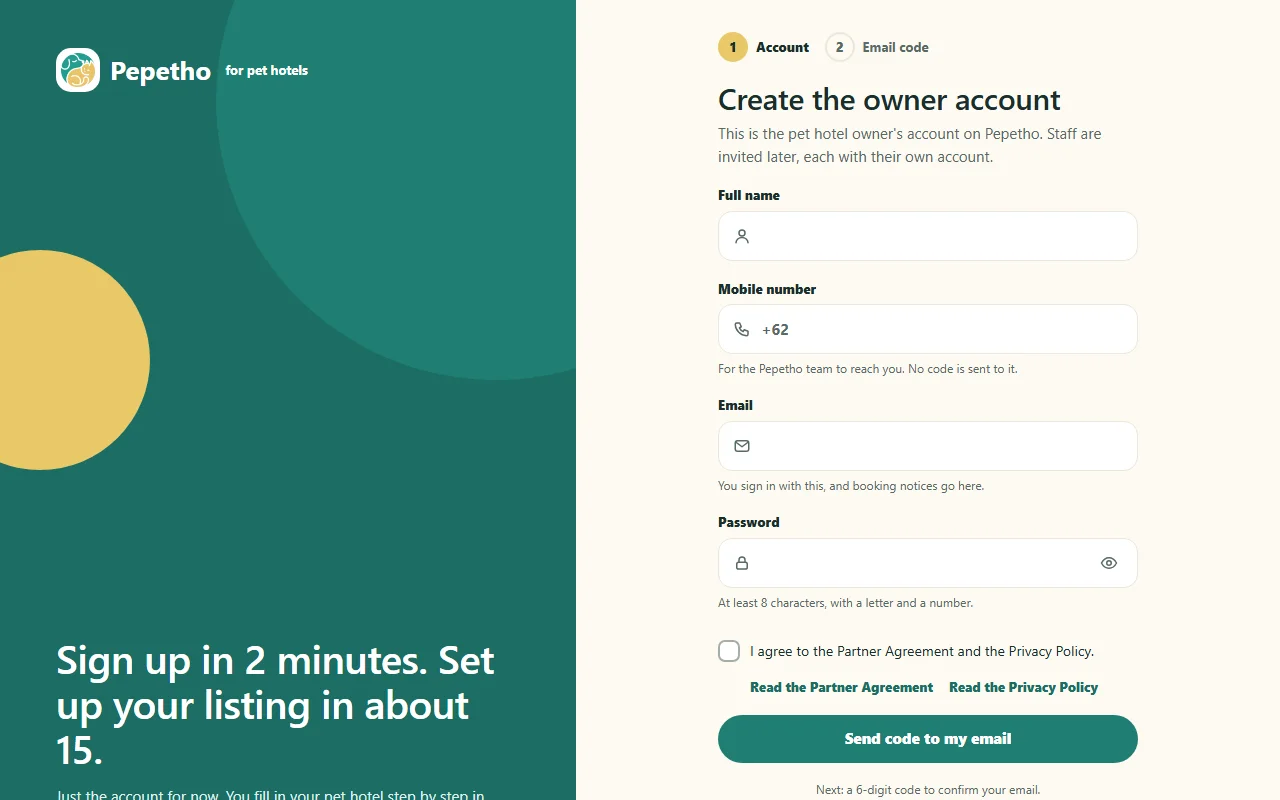
Step 1: create the owner account
- Open partner.pepetho.com/signup.
- Fill in Full name, Mobile number, Email and Password. The password needs at least 8 characters, with letters and numbers.
- Tick "I agree to the Partner Agreement and the Privacy Policy." Both documents open from their links.
- Press "Send code to my email".
The Pepetho team uses the mobile number to contact you. No code is sent to it. You sign in with the email, and booking notices go there.
Step 2: enter the code from the email
- Open the email from no-reply@pepetho.com. Nothing yet? Check the spam folder.
- Fill in the 6-digit code, then press "Verify and sign in".
- The code is valid for 10 minutes. If it runs out, press "Send a new code".
Typed the wrong email? Press "Change email" and repeat step 1.
Step 3: start your listing
Once the code is right, you are in the backoffice. The welcome screen asks for the Pet hotel name. You can change it later.
Press "Start: About the hotel" to open the first of six listing steps. Everything saves automatically, so you can stop and continue at any time.
Good to know
- One account per pet hotel. An email already registered at another pet hotel cannot be used again.
- Already have a Pepetho account, for example from the Pepetho app? Sign in with it and continue from there.
- Staff do not sign up themselves. The owner invites staff once the pet hotel is live. See Team and roles.
- Forgot your password? Use "Forgot password?" on the sign-in page. We send a 6-digit code to your email.