

Chapter 7
The availability calendar
See which units are taken over two weeks, and add a manual booking straight from a free day.
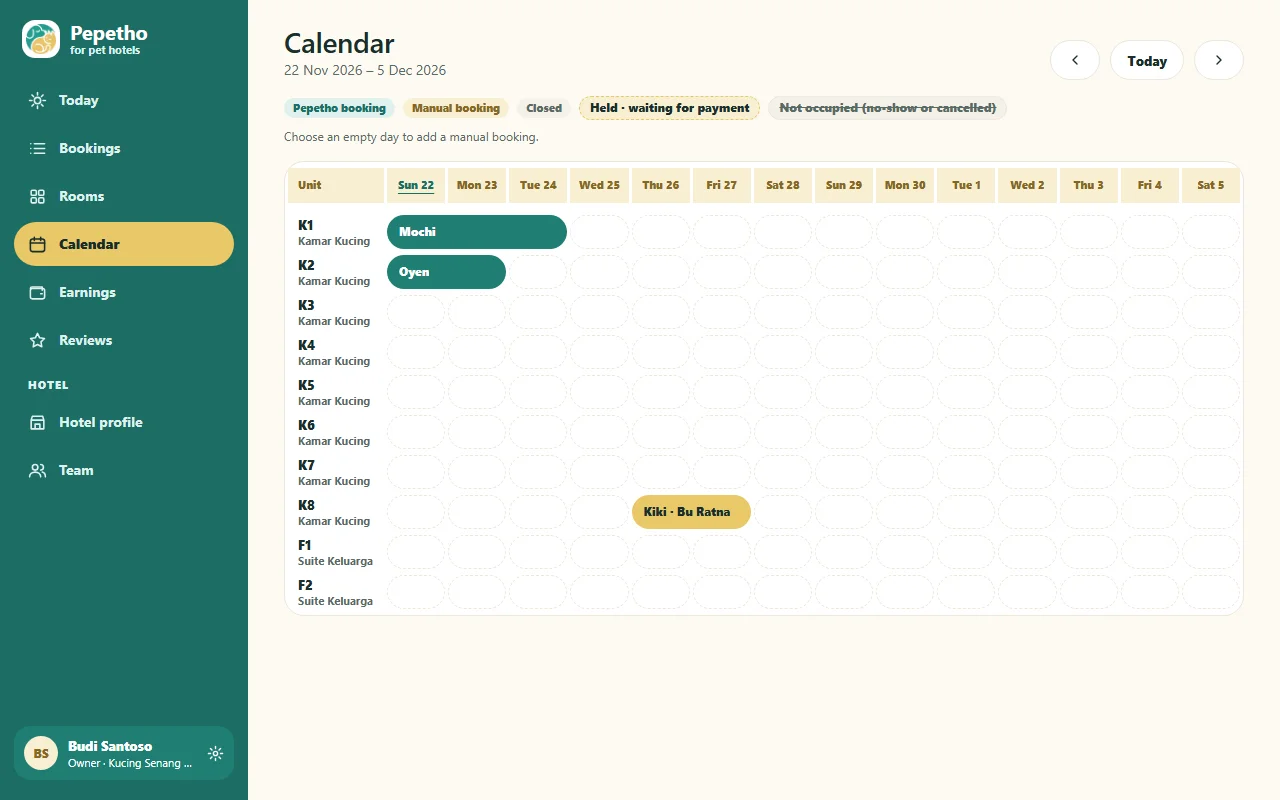
Calendar shows every unit per night, two weeks at a time. It opens once your pet hotel is live, for the owner and for staff.
Reading the calendar
Each row is one unit. Each column is one night. Colours and labels show what is there:
- Pepetho booking: booked through the app.
- Manual booking: recorded by you.
- Held · waiting for payment: a pet owner is paying.
- Closed: the unit or the hotel is closed that night.
- Not occupied (no-show or cancelled): the animal did not come, or the booking was cancelled.
Use Previous two weeks, Today and Next two weeks to move between dates.
Adding a manual booking from the calendar
- Choose a free day on the unit you want.
- The manual booking form opens with the unit and start date filled in.
- Complete the guest and animal details, then save.
See Handling bookings for the details of manual bookings.
Calendar still empty?
The calendar shows the units of your room types. If there are no units yet, add room types and units in Rooms. See Add rooms and rates.
To close a unit or the whole hotel on certain dates, use the Board or Closed dates tab in Rooms.