

Chapter 6
Handling bookings
The booking list, check-in and check-out, extras, manual bookings for guests who book with you directly, and cancellations.
Bookings from the Pepetho app arrive by themselves once the pet owner pays. You do not need to accept or approve them. You can turn on the New booking email in Your account.
The booking list
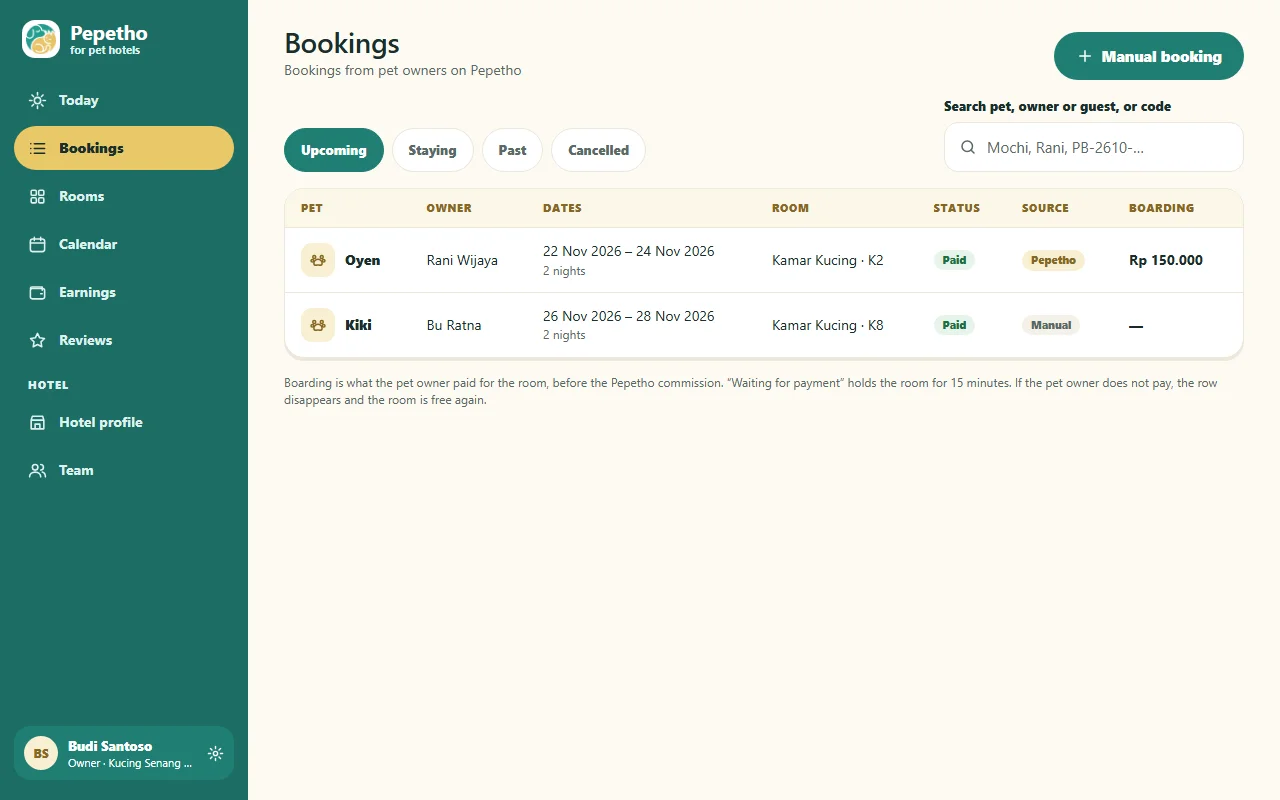
Bookings has the tabs Upcoming, Staying, Past and Cancelled. Search by pet name, owner or guest name, or a booking code such as PB-2610-0001.
"Waiting for payment" means the room is held for a short while. If the pet owner does not pay, the row disappears and the room is free again.
The pet owner's name and phone number show once the booking is paid. The Boarding column is what the pet owner paid, before the Pepetho commission.
Check-in
- On Today, press Check in for the arriving animal.
- Check the vaccine status. If a vaccine has expired or is missing, ask for a newer certificate, or write down what you agreed with the pet owner.
- Assign a room (unit) to the animal.
- Add a Handover note if needed. The customer sees this note too.
- Tick that the owner has handed over the animal and its belongings, then press Check in.
Check-in opens on the check-in date. It closes at 12:00 the day after, and the booking then becomes a No-show by itself.
If the animal does not meet the vaccine rules, choose "Decline · cancel and refund 100%". The pet owner gets back everything they paid.
During the stay
Open the animal's stay to:
- Send the daily update or Report an incident.
- Record Extras this stay, such as grooming. Extras are paid to you at the pet hotel, not through Pepetho, with no commission.
- Extend stay. Extra nights are paid to you at the nightly rate.
- Move to another room of the same type.
Check-out
- Press Check out on Today.
- Check the extras being charged. Choose how the owner paid: Cash, Transfer or Your own QRIS.
- Tick that the animal and its belongings went back to the owner, then press Check out.
After check-out, the unit is free and the pet owner is asked for a review. Your share gets its transfer date at check-out. See Earnings and payouts.
Manual bookings
For guests who book with you directly, record a manual booking so the unit is blocked on Pepetho:
- Press "Manual booking" on Today or Bookings, or choose a free day on Calendar.
- Fill in the Guest name, phone, Check-in and Check-out dates, Room type and Unit.
- Add each animal's name and weight, then press "Save booking".
A manual booking has no payment and no commission. You charge the guest yourself, and it does not count towards your Pepetho earnings.
Cancelling a booking
Open the booking and choose to cancel it, with a reason. For an app booking, the pet owner gets back 100% of what they paid, and your pet hotel gets nothing from that booking. A cancellation cannot be undone.
When the pet owner cancels, the unit is free again and the Pepetho team handles the refund.